
Moleskine Journal: A Little Every Day, Your Own Way
Moleskine Journal aims to become the go-to app for micro-journaling: capturing your thoughts, feelings, and everyday moments in small, meaningful entries. At its heart is a modular approach, with a home screen that adapts to your needs and the way you like to journal.
But what does “modular” actually mean?
Moleskine Journal is built around widgets. Each widget serves a specific purpose, and you can choose which ones to include on your home screen. Add or remove them, adjust their size, and arrange them wherever you prefer. Whether you want a space for daily reflection, a habit tracker, or a visual record of your days, you can build a layout that works for you.
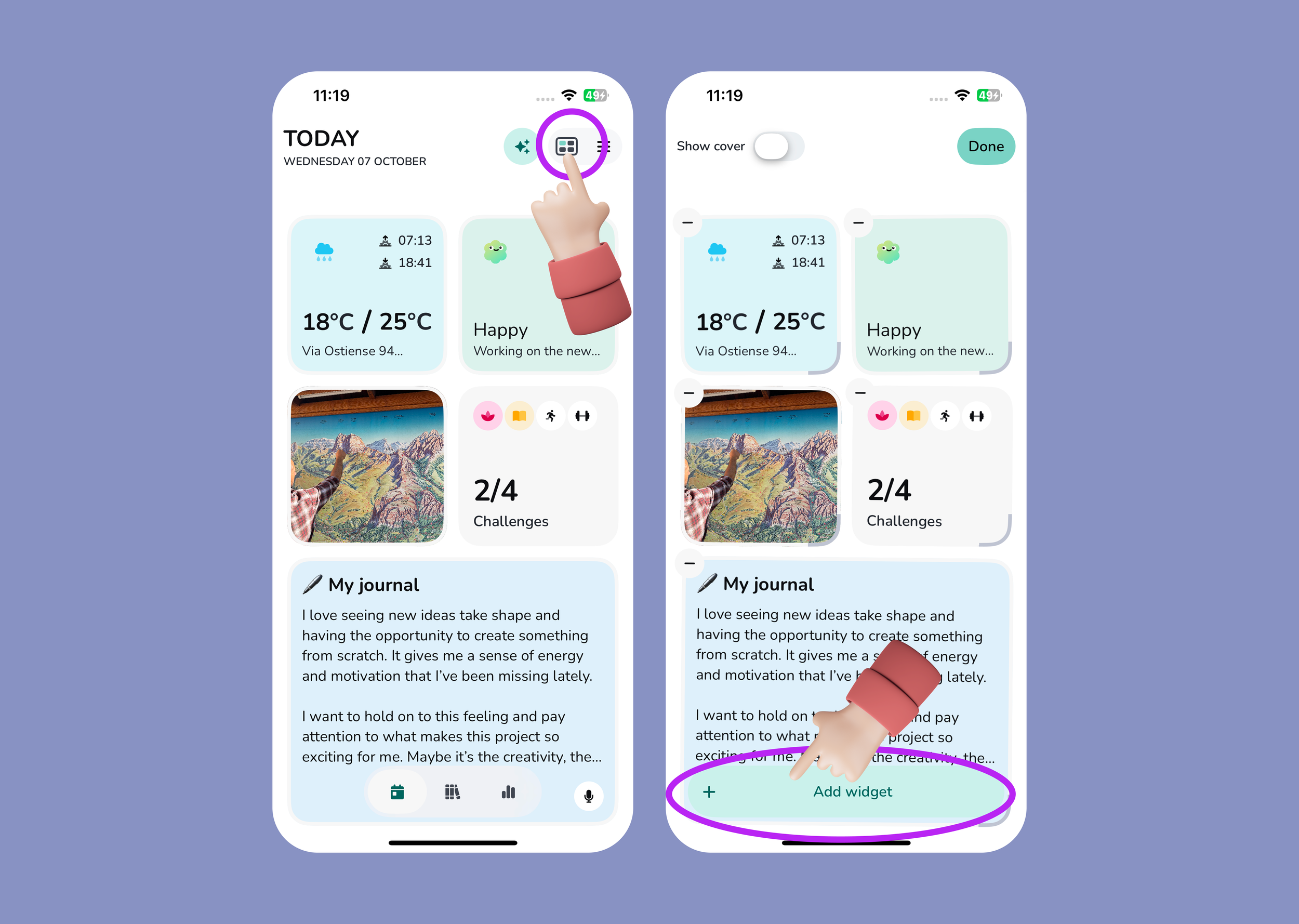
Make the App Your Own
To customise your home screen, tap the four-square icon in the upper-right corner. From there, you can add or remove widgets and change their size and position.
Moleskine Journal also offers an optional AI feature that provides a weekly summary of what you write and add to the app. To activate it, tap the three-star icon in the upper-right corner.
You don’t need to use every widget to get started. Choose the ones that feel useful, give them a place in your day, and adjust your home screen as your needs change. A few words, a mood check-in, or a single photo can be enough to begin.
Illustration includes graphical elements by Fuad H. Aslan (Handy Hands), licensed under Creative Commons Attribution 4.0 International (CC BY 4.0).
